
Now that we have successfully deployed the staging fabric using Ansible we will use GitLab and a CI/CD Pipeline to deploy the production fabric and then any additional changes we need to make to the production Fabric will first be tested in our safe staging fabric before pushing them to the production fabric.
First we need to create the same variable files for the production fabric just like we did for the staging fabric.
Production Fabric
Like you did back in the NDFC Ansible section, create an inventory file for your production fabric. When this is used in the pipeline,
it will be the inventory used with ansible-playbook -i. Since this file uses the same nd group name, your
previously developed playbooks remain unchanged and can be reused.
touch ~/workspace/ndlab/nac/hosts.prod.yml
cat << EOF > ~/workspace/ndlab/nac/hosts.prod.yml
---
# Inventory Information For Prod Fabric
nd:
  hosts:
    fabric-prod:
      ansible_host: 10.15.0.29
EOF
Prod data model files:
touch ~/workspace/ndlab/nac/host_vars/fabric-prod/fabric.nac.yml
cat << EOF > ~/workspace/ndlab/nac/host_vars/fabric-prod/fabric.nac.yml
---

vxlan:
  fabric:
    name: fabric-prod
    type: VXLAN_EVPN
EOF
touch ~/workspace/ndlab/nac/host_vars/fabric-prod/topology.nac.yml
cat << EOF > ~/workspace/ndlab/nac/host_vars/fabric-prod/topology.nac.yml
---
vxlan:
  topology:
    switches:
      - name: prod-spine1
        serial_number: CONNECT_TIMEOUT
        role: spine
        management:
          management_ipv4_address: 10.15.7.18
          default_gateway_v4: 10.15.7.1
      - name: prod-leaf1
        serial_number: CONNECT_TIMEOUT
        role: leaf
        management:
          management_ipv4_address: 10.15.7.19
          default_gateway_v4: 10.15.7.1
      - name: prod-leaf2
        serial_number: CONNECT_TIMEOUT
        role: leaf
        management:
          management_ipv4_address: 10.15.7.20
          default_gateway_v4: 10.15.7.1
      - name: prod-leaf3
        serial_number: CONNECT_TIMEOUT
        role: border
        management:
          management_ipv4_address: 10.15.7.21
          default_gateway_v4: 10.15.7.1
EOF
To help speed up the process of creating the production fabric files, you can copy this entire section and paste it into your terminal to create all the files at once. All of these files and their contents are very similar to the staging fabric files you created earlier. They are just modified to reflect the production fabric names and IP addresses.
touch ~/workspace/ndlab/nac/host_vars/fabric-prod/global.nac.yml
cat << EOF > ~/workspace/ndlab/nac/host_vars/fabric-prod/global.nac.yml
---

vxlan:
  global:
    ibgp:
      bgp_asn: "65001"
      route_reflectors: 2
      anycast_gateway_mac: 12:34:56:78:90:00
      dns_servers:
        - ip_address: 10.0.249.16
          vrf: management
      ntp_servers:
        - ip_address: 10.81.254.131
          vrf: management
EOF

touch ~/workspace/ndlab/nac/host_vars/fabric-prod/underlay.nac.yml
cat << EOF > ~/workspace/ndlab/nac/host_vars/fabric-prod/underlay.nac.yml
---

vxlan:
  underlay:
    general:
      routing_protocol: ospf
      underlay_routing_loopback_id: 0
      underlay_routing_protocol_tag: UNDERLAY
      underlay_vtep_loopback_id: 1
      replication_mode: multicast
    ipv4:
      fabric_interface_numbering: p2p
      subnet_mask: 31
      underlay_routing_loopback_ip_range: 10.11.0.0/22
      underlay_vtep_loopback_ip_range: 10.111.100.0/22
      underlay_rp_loopback_ip_range: 10.251.251.0/24
      underlay_subnet_ip_range: 10.1.0.0/16
    ospf:
      area_id: 0.0.0.0
    multicast:
      underlay_rp_loopback_id: 250
      rp_mode: asm
EOF

touch ~/workspace/ndlab/nac/host_vars/fabric-prod/vpc.nac.yml
cat << EOF > ~/workspace/ndlab/nac/host_vars/fabric-prod/vpc.nac.yml
---

vxlan:
  topology:
    vpc_peers:
      - peer1: prod-leaf1
        peer2: prod-leaf2
        fabric_peering: true
EOF

touch ~/workspace/ndlab/nac/host_vars/fabric-prod/interfaces_access.nac.yml
cat << EOF > ~/workspace/ndlab/nac/host_vars/fabric-prod/interfaces_access.nac.yml
---

vxlan:
  topology:
    switches:
      - name: prod-leaf1
        interfaces:
          - name: Ethernet1/1
            mode: access
            description: VLAN 2301 Access Interface
            enabled: true
            mtu: jumbo
            speed: auto
            enable_bpdu_guard: false
            access_vlan: 2301
            spanning_tree_portfast: true
      - name: prod-leaf2
        interfaces:
          - name: Ethernet1/1
            mode: access
            description: VLAN 2302 Access Interface
            enabled: true
            mtu: jumbo
            speed: auto
            enable_bpdu_guard: false
            access_vlan: 2302
            spanning_tree_portfast: true
EOF

touch ~/workspace/ndlab/nac/host_vars/fabric-prod/interfaces_vpc.nac.yml
cat << EOF > ~/workspace/ndlab/nac/host_vars/fabric-prod/interfaces_vpc.nac.yml
---

vxlan:
  topology:
    switches:
      - name: prod-leaf1
        interfaces:
          - name: port-channel10
            mode: trunk
            enabled: true
            pc_mode: active
            vpc_id: 10
            members:
              - eth1/5
            mtu: jumbo
            speed: auto
            trunk_allowed_vlans:
              - from: 2301
                to: 2302
            spanning_tree_portfast: true
          - name: port-channel20
            mode: trunk
            enabled: true
            pc_mode: active
            vpc_id: 20
            members:
              - eth1/6
            mtu: jumbo
            speed: auto
            spanning_tree_portfast: true
      - name: prod-leaf2
        interfaces:
          - name: port-channel10
            mode: trunk
            enabled: true
            pc_mode: active
            vpc_id: 10
            members:
              - eth1/5
            mtu: jumbo
            speed: auto
            trunk_allowed_vlans:
              - from: 2301
                to: 2302
            spanning_tree_portfast: true
          - name: port-channel20
            mode: trunk
            enabled: true
            pc_mode: active
            vpc_id: 20
            members:
              - eth1/6
            mtu: jumbo
            speed: auto
            spanning_tree_portfast: true
EOF

touch ~/workspace/ndlab/nac/host_vars/fabric-prod/vrfs.nac.yml
cat << EOF > ~/workspace/ndlab/nac/host_vars/fabric-prod/vrfs.nac.yml
---
vxlan:
  overlay:
    vrfs:
      - name: NaC-VRF01
        vrf_id: 150001
        vlan_id: 2001
        vrf_attach_group: all
    vrf_attach_groups:
      - name: all
        switches:
          - hostname: prod-leaf1
          - hostname: prod-leaf2
EOF

touch ~/workspace/ndlab/nac/host_vars/fabric-prod/networks.nac.yml
cat << EOF > ~/workspace/ndlab/nac/host_vars/fabric-prod/networks.nac.yml
---
vxlan:
  overlay:
    networks:
      - name: NaC-Net01
        vrf_name: NaC-VRF01
        net_id: 130001
        vlan_id: 2301
        vlan_name: NaC-Net01_vlan2301
        gw_ip_address: 192.168.1.1/24
        network_attach_group: all
      - name: NaC-Net02
        vrf_name: NaC-VRF01
        net_id: 130002
        vlan_id: 2302
        vlan_name: NaC-Net02_vlan2302
        gw_ip_address: 192.168.2.1/24
        network_attach_group: all
    network_attach_groups:
      - name: all
        switches:
          - hostname: prod-leaf1
            ports:
              - port-channel10
          - hostname: prod-leaf2
            ports:
              - port-channel10
EOF
Perform a git add to move your configuration intent for your prod fabric to git staging.
git add .
Review what is staged to be committed to your git repo.
git status .
The following files are staged for commit. Make sure your list matches the output below!
  On branch main
  Your branch is up to date with 'origin/main'.

  Changes to be committed:
    (use "git restore --staged ..." to unstage)
          new file:   host_vars/fabric-prod/fabric.nac.yml
          new file:   host_vars/fabric-prod/global.nac.yml
          new file:   host_vars/fabric-prod/interfaces_access.nac.yml
          new file:   host_vars/fabric-prod/interfaces_vpc.nac.yml
          new file:   host_vars/fabric-prod/networks.nac.yml
          new file:   host_vars/fabric-prod/topology.nac.yml
          new file:   host_vars/fabric-prod/underlay.nac.yml
          new file:   host_vars/fabric-prod/vpc.nac.yml
          new file:   host_vars/fabric-prod/vrfs.nac.yml
          new file:   hosts.prod.yml
Commit your prod configuration intent with a meaningful message.
git commit -m "Add VXLAN as Code Production Data Model Files"
  [main a3b55f4] Add VXLAN as Code Production Data Model Files
  10 files changed, 206 insertions(+)
  create mode 100644 host_vars/fabric-prod/fabric.nac.yml
  create mode 100644 host_vars/fabric-prod/global.nac.yml
  create mode 100644 host_vars/fabric-prod/interfaces_access.nac.yml
  create mode 100644 host_vars/fabric-prod/interfaces_vpc.nac.yml
  create mode 100644 host_vars/fabric-prod/networks.nac.yml
  create mode 100644 host_vars/fabric-prod/topology.nac.yml
  create mode 100644 host_vars/fabric-prod/underlay.nac.yml
  create mode 100644 host_vars/fabric-prod/vpc.nac.yml
  create mode 100644 host_vars/fabric-prod/vrfs.nac.yml
  create mode 100644 hosts.prod.yml
Finally, push your commit to your remote repo in GitLab.
git push -u origin main
  Enumerating objects: 16, done.
  Counting objects: 100% (16/16), done.
  Delta compression using up to 8 threads
  Compressing objects: 100% (14/14), done.
  Writing objects: 100% (14/14), 2.32 KiB | 1.16 MiB/s, done.
  Total 14 (delta 2), reused 0 (delta 0), pack-reused 0
  To 10.15.0.159:Pod01_2025_01/LTRDCN-2621.git
    31566cd..a3b55f4  main -> main
  Branch 'main' set up to track remote branch 'main' from 'origin'.
In Gitlab, you need to refresh the page to see your repo populated.

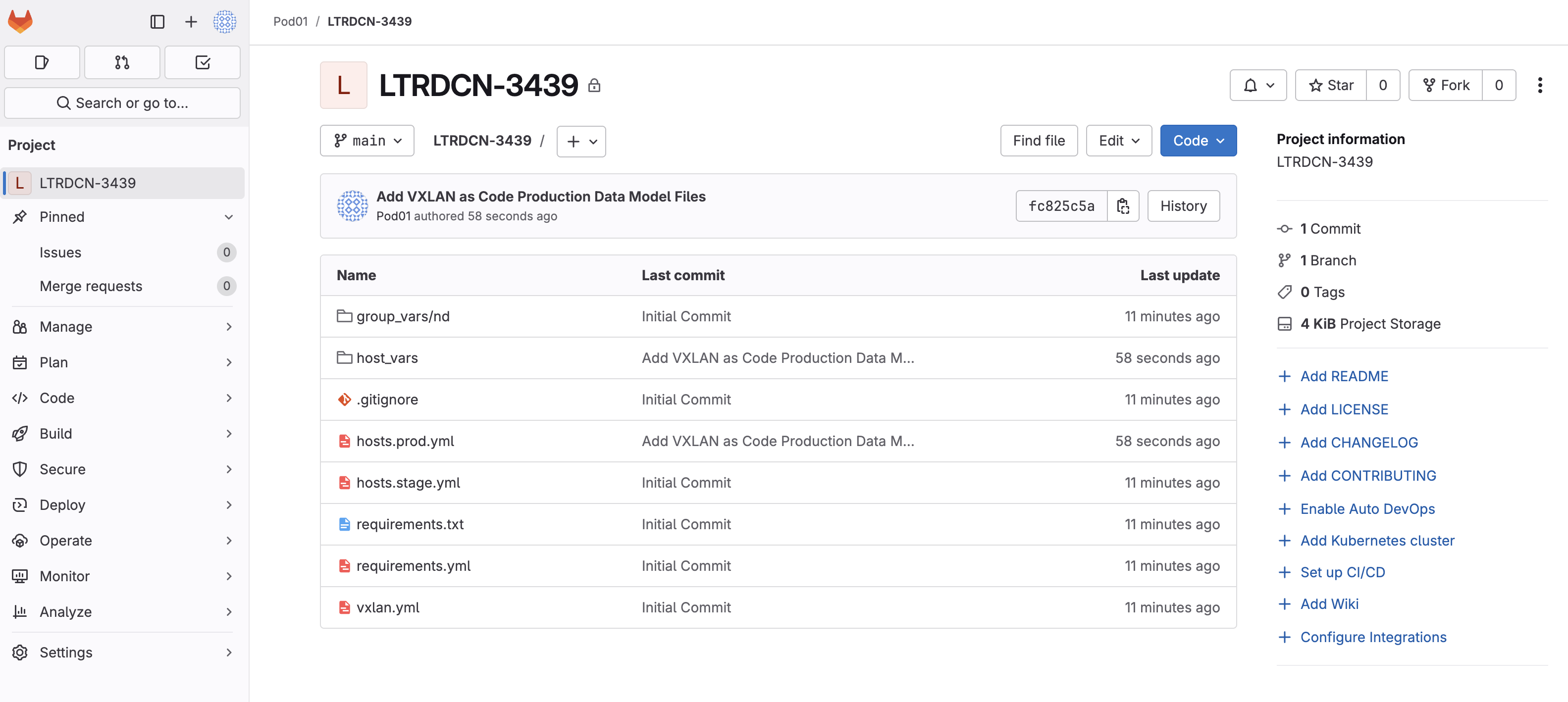
Continue to the next section to define your GitLab CI file for your CI/CD pipeline.